MCP SERVER

Connect AI Agents to Your Social Media Accounts

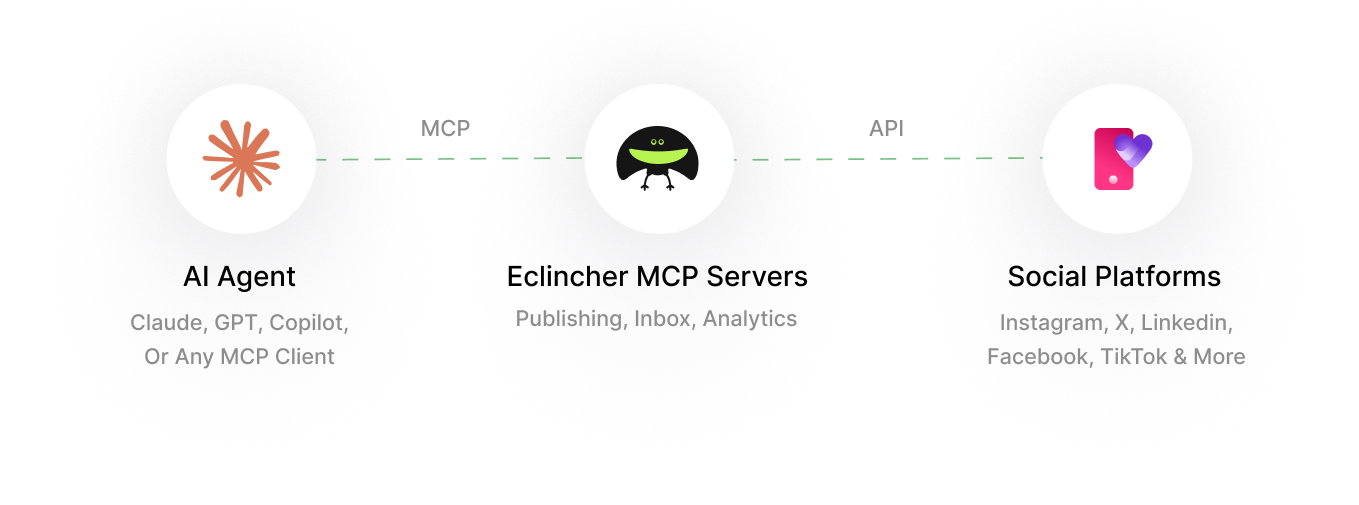
Eclincher's MCP server lets AI assistants like Claude, ChatGPT, Cursor, manage your social media accounts directly, publish posts, moderate your inbox, and pull analytics across all your social networks.
One connection. Full-stack social media management. No code required.
Trusted by Marketing Leaders of The Most Recognized Brands Worldwide

What is MCP?

MCP (Model Context Protocol) is an open standard created by Anthropic that lets AI assistants connect to external tools and data. When you add Eclincher's MCP server to Claude or Cursor, the AI can manage your social media the same way a team member would, but faster.
01 — Publishing

Publish to 8 Networks from One Prompt

Create and schedule posts to Facebook, Instagram, X/Twitter, LinkedIn, TikTok, Pinterest, YouTube, and Google Business Profile. Supports text, images, and video.

Multi-network at once - one prompt, every channel

Future scheduling with picked dates and times

Text, image, and video uploads supported

AI
You Claude
via Eclincher MCP
Live

"Schedule a product launch post to Instagram, LinkedIn, and TikTok for tomorrow at 9 AM."

Scheduled to 3 networks
AI
You Claude
via Eclincher MCP
Live

"Show me all unanswered DMs and comments from this week."

14 unanswered messages
@sarah_chen
Do you ship internationally?
DM
@marcus_b
When does the new collection drop?
Comment
@elena_p
Loving the new branding 🎉
Mention
02 — Inbox

Manage your Social Inbox by Conversation

Read and manage DMs, comments, and mentions across all connected platforms - the only MCP server that offers social inbox access.

Unified inbox across all connected networks

Filter by platform, date, status, or sender

The only social inbox API on the market

03 — Analytics

Pull Reports Without Opening a Dashboard

Access 5 report types: performance metrics, profile comparisons, custom reports, competitor benchmarks, and cross-channel aggregated analytics

Performance, comparison, custom, competitor & cross-channel

Period-over-period comparisons in one prompt

Benchmark against your competitors

AI
You Claude
via Eclincher MCP
Live

"How did our Instagram perform this month vs last? How do we compare to competitors?"

Report ready
+47%
Engagement vs last month
+12%
vs competitor average

From Zero to AI-managed Social in 3 Steps.

No npm install. No local setup. The AI connects directly to Eclincher's cloud.

01
Sign up & connect socials
Create your Eclincher account and connect your social media profiles.
02
Get your API key
Go to Settings → API in your Eclincher dashboard to generate your key.
03
Add to your AI assistant
Paste the configuration into Claude Desktop, Cursor, Windsurf, VS Code, or any MCP client.
claude_desktop_config.json
{
  "mcpServers": {
    "eclincher": {
      "url": "https://app.eclincher.com/mcp",
      "headers": {
        "x-eclincher-api-key": "YOUR_API_KEY"
      }
    }
  }
}

Works with the AI you're Already Using.

Eight ways to connect, all with the same API key. Switch clients, keep the workflow.

Claude Desktop
Add to claude_desktop_config.json
Claude.ai
Settings → Integrations → Add MCP
Cursor IDE
.cursor/mcp.json in project root
Windsurf IDE
Settings → MCP Servers → Add
VS Code (Copilot)
.vscode/mcp.json in project
Continue.dev
~/.continue/config.json
Cline
Settings → MCP Servers → Add Remote
ChatGPT
Custom GPT with eClincher API actions

Everything an AI Assistant Needs to Run Social

Each tool is exposed natively to your AI client - no glue code, no wrappers.

list_brands
See all your brands
create_brand
Create a new brand
list_accounts
See connected social profiles
create_post
Publish or schedule posts
list_inbox
Read DMs, comments, mentions
get_builtin_report
Performance analytics
get_comparison_report
Compare profiles side-by-side
list_custom_reports
See your custom reports
get_custom_report
Pull custom report data
list_competitor_reports
See competitor reports
get_competitor_report
Competitor benchmarks
get_cross_channel_report
Get analytics across all networks

The Only full-stack Social MCP

Most social MCPs do one thing on one network. eClincher covers publishing, inbox, and analytics - across 8 networks.

Feature

Eclincher MCP

Full-stack · Included

Other Social MCPs

Single-purpose

Publishing networks 8 networks Usually 1 network
Inbox (DMs, comments, mentions) All networks Not available
Analytics report types 5 types Limited or none
Full-stack (publish + inbox + analytics) Only one None
FAQ’s

Things People Usually Ask First

Do I need to install anything?

No. Eclincher MCP is a remote server - your AI client connects directly via URL. No npm, no downloads, no local process.

Which AI assistants are supported?

Any MCP-compatible client - Claude Desktop, Claude.ai, Cursor, Windsurf, VS Code with Copilot, Continue.dev, and Cline. ChatGPT works via custom GPT with our API.

Can multiple team members use MCP at the same time?

Yes. All users on your plan share the same API key. The Professional plan supports up to 10 users running Claude Desktop simultaneously.

What social networks are supported?

Facebook, Instagram, X/Twitter, LinkedIn, TikTok, Pinterest, YouTube, and Google Business Profile.

Is there a free trial?

Yes - 14 days, all features included, cancel anytime.

Hand the Social Work to Your AI

14-day free trial. Connect Claude or Cursor in 3 minutes.